
Here you will a list of some problems you might encounter doing the labs, and some steps to resolve the issues.
X2GO won't register inputs
This often occurs because of the inbuilt screensaver on the VM.
The first thing you need to do is to restart the X2GO session, which you do by pressing the shutoff button in the X2GO control terminal shown here:
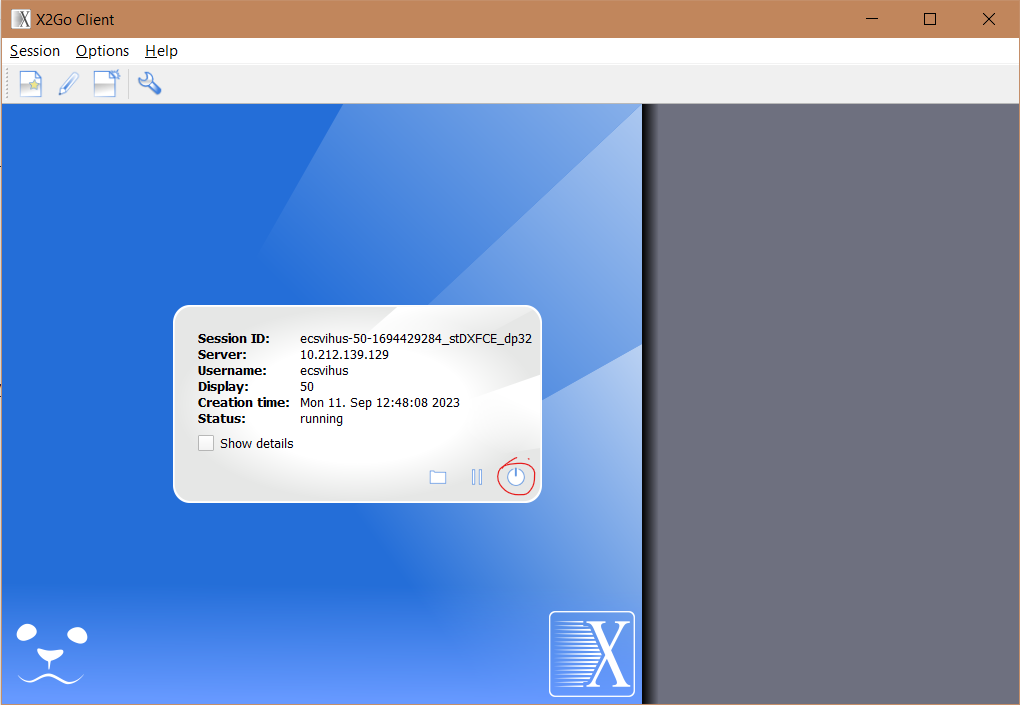
This will only temporarily resolve the problem, and to fix it permanently you have to disable the screensaver.
you can easily do this by going into the screensaver settings here:

And turn the screensaver off:

Problems with OSPFD /BGPD on FRR
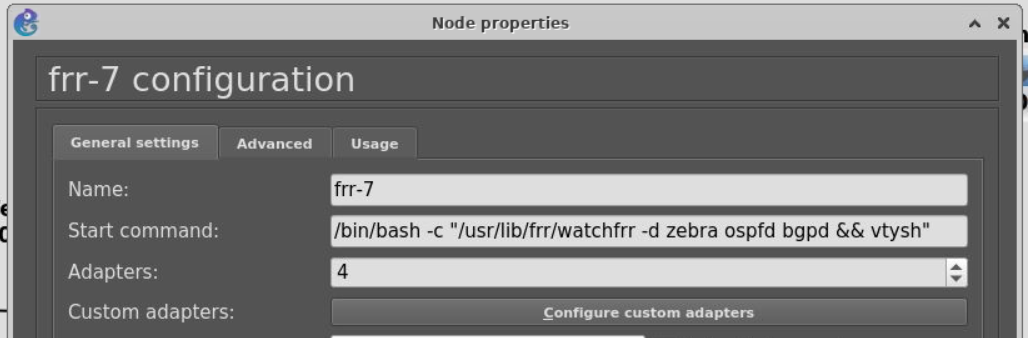
Check the startup command which you can find in the FRR configuration. Make sure that the following command is used: /bin/bash -c "/usr/lib/frr/watchfrr -d zebra ospfd bgpd && vtysh"
Problems with VLANs on cisco 3750 switches
Try to add more memory by going into configuration->Memories and disk and add some memory to PCMCIA disk0 as shown below.
Important: Uncheck the check box "Automatically delete NVRAM and disk files". Otherwise your VLAN configs will be gone after a restart.
If you encounter problems with saving the vlans you need to format the flash using "format flash:" in the normal mode.

BGP won't advertise routes on FRR
try running no bgp ebgp-requires-policy
VyOS won't boot, with error "could not rebase image"
this happens if there is a vyos process running in the background when it shouldn't. so the fix is to simply shut this vyos instance off. But you can't do this through gns3 so you have to do it from the terminal.
The first thing you need to do is shut off all the routers in the project and the run this comand to find the port number belonging to the vyos router.
ss -tulpn | grep gns
which should look something like this:

the important place to look here is the column with 127.0.0.1:xxxx
you will need to test out the different ports that are show up, and in this case there are 2, 3080 and 5041.
the port number usually starts with 5 so i'll test the 5041 port first.
To connect to the router we use the following telnet command "telnet localhost <portnumber>" and the result should look something like this:

then you can run "sudo shutdown now" which should solve the problem and you should be able to run vyos.
If this solution does not give desired results, it is possible to simply reboot the VM from the terminal emulator. Enable sudo user by writing sudo su, then reboot.
Remember to save any configuration changes, and extract any desired files from the manager device before shutting down.
Shared folder is no longer visible
Sometimes "shared folder" might disappear from the VM. Turning automount off and on does not help. The issue is fixed by completely removing the respective path. Save your changes, and then readd the path.
Slow performance and connection issues for MAC users
It was observed that X2Go client may not be the best option on MAC. For those who are experiencing an issue, it is recommended to switch to Xpra instead. However, during sessions if multiple team members are connecting at the same time, you must be aware that leaving the session will interrupt other users. This can be solved by reopening the session.